
64 posts tagged with "erd"

View All Tags

Magnetizing diagram elements

· 4 min read
Simon Porritt
JsPlumb core team

JsPlumb has support for layouts baked in, shipping with a Force Directed layout, Hierarchy layout, Balloon layout and Circular layout, as well as supporting Absolute positioned nodes and groups and a powerful and simple api for creating custom layouts.

Sometimes, though, you just want to make small adjustments to the elements in your UI to neaten things up a bit, and the JsPlumb offers a very handy utility for doing so - the magnetizer. It's a collection of tools you can use to nudge elements around.
Fixed and floating elements (also, how the snaplines plugin works)

· 6 min read
Simon Porritt
JsPlumb core team

Snaplines plugin

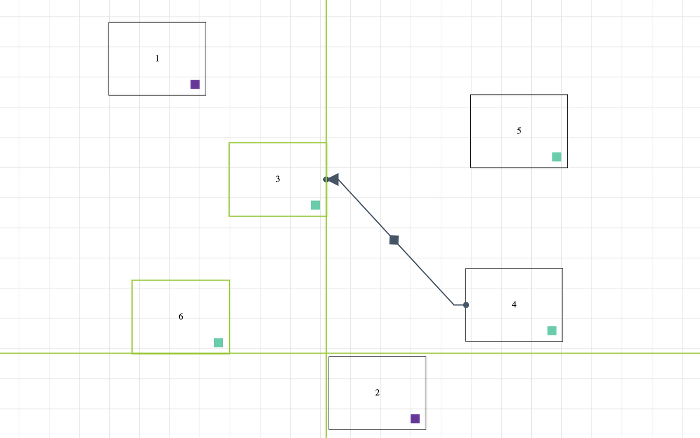
In version 6.7.0 we released a new plugin - Snaplines - which you can see in action in our Flowchart builder demonstration. In this post we're going to look at a couple of methods offered by the surface component which allowed us to implement snaplines in a matter of hours.

This is a picture of the snaplines plugin in action:

Snaplines - align your flowcharts perfectly - JsPlumb - Angular, React, Vue, Svelte diagramming library

The internal workings of this plugin are quite simple:

Release 6.7.2

· One min read
Simon Porritt
JsPlumb core team

UPDATES

  • Fixed an issue writing attributes to the xlink namespace in the vanilla template engine
  • Updated template parsing code to better handle extraneous whitespace.
  • Improvements to the preview view of the svg/png/jpg export code
  • Updated jsdocs for Vue 2 and Vue 3 integration packages
  • Added the ability to register a Surface on Vue 2 and Vue 3 manually - allowing you to use vanilla templating inside of a Vue app.

BREAKING

  • The order of arguments in the fixElement method has been switched from (el:Element, constraints:FixedElementConstraints, pos:PointXY) to (el:Element, pos:PointXY, constraints?:FixedElementConstraints). This better reflects the fact that constraints is an optional argument whereas pos is not.

JointJS - JsPlumb Comparison

· 7 min read
Simon Porritt
JsPlumb core team

One question we hear a lot from prospective licensees is how does JsPlumb compare as an alternative to JointJS? The people at JointJS have taken several stabs at summarizing this but the results can at best be described as an exercise in creative writing.

In today's post I'm going to jot down a few thoughts of our own, plus those of the many developers who come to us once they've reached the limit of JointJS's capabilities.

Release 6.7.0

· 2 min read
Simon Porritt
JsPlumb core team

What's new?

Snaplines plugin

We've added a brand new plugin in this release - Snaplines:

Snaplines - align your flowcharts and diagrams perfectly - JsPlumb - Angular, React, Vue, Svelte diagramming library

When the edge or center of any two elements is in proximity a snapline appears, in green (by default - but you can change that with CSS). When they are exactly in line, the snapline goes red. The related element for an active snapline is also assigned a CSS class, for maximum flexibility for your design team.

You can see this plugin in action in the Flowchart builder. We're looking forward to seeing what you build with it!

Release 6.6.3

· One min read
Simon Porritt
JsPlumb core team

Inspector component

  • When in autoCommit mode (which is the default) the inspector listens for Enter key press events on text inputs and textareas, and commits the value in response.
  • When JsPlumb's current selection is cleared, the inspector ensures that it commits any values that have changed but not yet been committed

Overlays

  • Fixed a sizing issue with the background element of an SVG text overlay - it now takes the underlying zoom into account.

Controls component

  • We added support for an onMaybeClear prop on the React controls component - when present, instead of popping up a browser confirm dialog in response to a click on the clear button, this function is invoked instead. This will allow you to fit the React controls component in more nicely with your apps.

Release 6.6.2 - Rotating custom overlays

· 2 min read
Simon Porritt
JsPlumb core team

What's new?

In this release we've made a small tweak to the way we render custom overlays which supports automatically updating their orientation based upon the endpoints of their edge. Let's say we want to put this SVG at each end of our edges:


Since we want this at the start and at the end we'll write a factory to create a spec for a custom overlay:

function customOverlayFactory(location, color) {
return {
type:"Custom",
options:{
create:function(component) {
const d = document.createElement("div")
d.className="rotating-custom-overlay"
d.style.width = "16px"
d.style.height = "20px"
d.innerHTML = `
<svg width="100%" height="100%" viewBox="0 0 16 21">
<rect x="0" y="0" fill="${color}" width="10" height="21"/>
<rect x="10" y="7" fill="${color}" width="6" height="7"/>
</svg>`
return d
},
location:location
}
}
}