64 posts tagged with "inspector"

View All Tags

Release 7.3.5

· One min read

This release contains a few nice enhancements to our Hierarchy layout:

  • All "child" vertices of an already placed vertex are located in the next layer down.

Previously, certain arrangements of nodes (generally involving multiple parents) could result in the target of some edge being placed on the same layer of the hierarchy as the source o the edge. In 7.3.5 this does not happen.

  • Arrangements where leaf nodes are at the start/end of each layer are preferred

The Hierarchy layout runs in several stages, one of which - the "crossing" stage - is responsible for rearranging each layer of the hierarchy to reduce edge crossings. Previously, we would make no distinction between two orderings if they had the same number of crossings. In 7.3.5 when we have two orderings that have the same number of edge crossings we pick the ordering which has the most number of leaf vertices at either the start or end of its layers.

  • Updated to ensure child elements of vertices that have multiple parents are always placed correctly

In some instances involving multiple parents, child elements were being shifted multiple times, taking them out of alignment. This is fixed in 7.3.5.

Release 7.3.3

· 2 min read

This page covers releases 7.3.3, 7.3.2 and 7.3.1. The main focus of these releases is the introduction of nested shape sets.

Nested Shape Sets

From 7.3.1 onwards it is possible to nest shape sets, via the children property of a shape set. For example, here is a spec for a shape set which has no shapes of its own, but two shape sets declared inside children:

nested shape set spec - JsPlumb, leading alternative to GoJS, JointJS and ReactFlow

Nested sets are displayed when Show All is selected in the palette:

palette with show all - JsPlumb, industry standard diagramming and rich visual UI Javascript library

When a set that contains children is the selected set, users are initially shown all of the nested sets, with a picker allowing them to select a nested set:

selected set - JsPlumb, industry standard diagramming and rich visual UI Javascript library

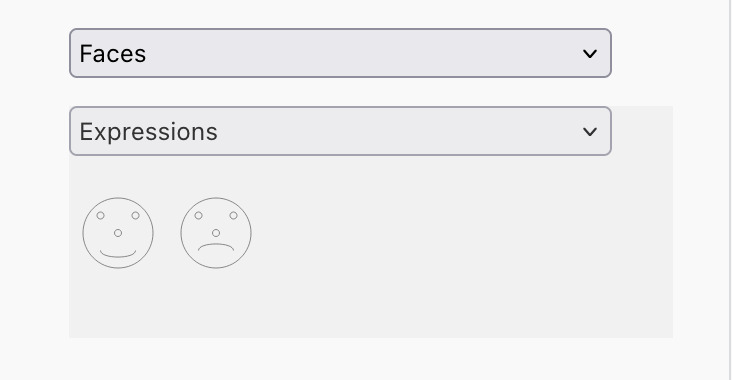
selected nested set - JsPlumb, industry standard diagramming and rich visual UI Javascript library

Shape sets can be nested to arbitrary depth - the only limit is really the question of usability!

Read more at https://docs.jsplumbtoolkit.com/toolkit/7.x/lib/nodes-and-groups/shape-libraries#nested-shape-sets

Full changelog

  • Added support for shape sets to nest other shape sets.
  • Fixed an SVG export issue in which in certain scenarios edge paths could be painted with an incorrect offset
  • Added transformOrigin to the payload return by the exportData method on a Surface
  • Added JS docs for various parameter interfaces
  • Updated shape library palette to use CSS to hide/show sets, rather than directly manipulating their style elements. This helps ensure that JsPlumb doesn't impose itself on how you want to style those elements.

Start a free trial

Not a user of JsPlumb but thinking of checking it out? There's a whole lot more to discover and it's a great time to get started!


Get in touch!

If you'd like to discuss any of the ideas/concepts in this article we'd love to hear from you - drop us a line at hello@jsplumbtoolkit.com.

Release 7.3.0

· 4 min read

This release contains several updates that bring an extra level of professionalism to your flowchart/diagram apps.

Multiline SVG labels

We updated the ShapeLibrary to add support for multiline labels on shapes, and updated our Flowchart Builder starter app to include this new functionality.

multiline labels in flowchart builder - JsPlumb, industry standard diagramming and rich visual UI Javascript library

Recent color history in inspectors

When working with inspectors, it is extremely useful to be able to choose a color from a list of recent colors - JsPlumb now provides support for this out of the box. You can use multiple color pickers and they all share the same context - here's the node inspector in our flowchart builder now:

recently selected colors - JsPlumb, industry standard diagramming and rich visual UI Javascript library

and here's the edge inspector:

recently selected colors - JsPlumb - JavaScript and Typescript diagramming library that fuels exceptional UIs

Cloning vertices in the Surface canvas

Another feature of professional flowchart builders is the ability to clone some existing vertex - this has been added to JsPlumb in version 7.3.0, and we use it in the flowchart builder starter app:

clone node - JsPlumb, flowcharts, chatbots, bar charts, decision trees, mindmaps, org charts, gantt charts and more

Save/load data and Surface state

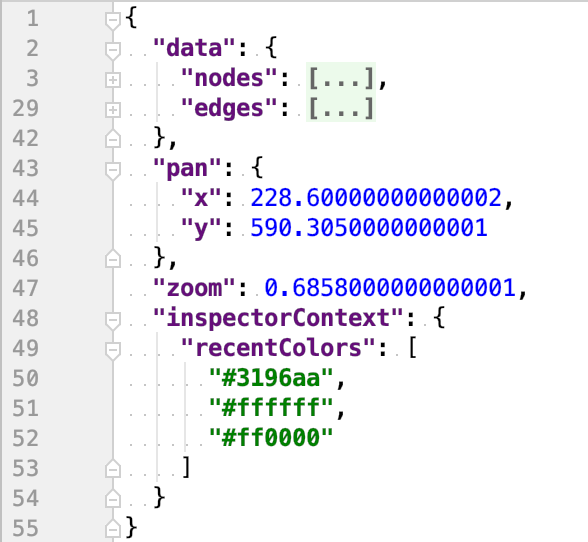
In 7.3.0 you can now call exportData() on a Surface, not just on the model. When you call it on a Surface, the returned payload contains the dataset along with the current pan/zoom for the Surface, and also any context information stored by attached inspectors. Coupled with the new load method on the Surface, you can now save and restore the UI to the exact state it was in.

clone node - JsPlumb - When you've reached the limit with ReactFlow, we can help!

Release 7.2.0

· 2 min read

Callflow Builder starter app

We've added a Callflow Builder starter app, with Angular and React versions:

Callflow Builder app - JsPlumb - When you've reached the limit with ReactFlow, we can help!

Check it out here.

Updates

  • We implemented a new default paint mechanism for Bezier where the curviness is reduced as the elements get closer together, because the control point is specified as a fraction of the distance between the two anchors. This results in a curve that doesn't spike past the anchor points and generally has a nicer aesthetic. See Breaking section if you want the old way.

  • Connectors and Endpoints now use an SVG g element as their container when useSvgContainer is set on the surface options.

  • Updated the Inspector to track programmatic updates in items it is inspecting, and to update its UI when a matching update is found.

  • Added an InspectorComponent to the Angular integration, making it easier to add an Inspector to your Angular apps.

  • The selector prop on the React PaletteComponent is now optional, defaulting to "[data-jtk-type]"

  • The selector prop on the Angular jsplumb-drag-drop directive is now optional, defaulting to "[data-jtk-type]"

  • The selector param on DropManager and SurfaceDropManager is now optional, defaulting to "[data-jtk-type]"

  • Inspectors now support the RANGE input type.

  • The React InspectorComponent now supports an optional afterUpdate callback prop. This is invoked after the underlying inspector has run an update.

  • The onEdit callback of the DrawingToolsPlugin now passes the Surface and Toolkit to the callback function.

  • We've ported our Gantt starter to React

Annotating objects with drag groups

· 9 min read

One of the key differentiators between JsPlumb and other libraries in this space is JsPlumb's level of configurability - more often than not you'll find that once you hit a blocker in some other library, JsPlumb will offer you the ability to do what you need.

A great example of this is JsPlumb's concept of a DragGroup. Simply put, this is a group of vertices that should be dragged together - but as we'll see, it's not quite as simple as that, and it can be used to great effect with minimal work required on your part.

Active vs passive members

In this canvas, try dragging the large green box around. You'll see the two red boxes drag along with it. Now try dragging one of the red boxes - nothing else moves. This is because all of the nodes are inside a drag group, but the large green node is marked active and the red nodes are marked passive:


Release 7.1.0

· 2 min read

New Functionality

  • New Overlay option visibility added: use "hover" to specify that some overlay should only be visible when the mouse is hovering over the edge.

Specifying an overlay that should only appear on hover - JsPlumb - Angular, React, Vue, Svelte diagramming library

Specifying an overlay that should only appear on hover - JsPlumb, build diagrams and rich visual UIs fast

  • Edge definitions in a view now support an optional deleteButton parameter, which instructs JsPlumb to show a delete button overlay on edges of that type that are rendered. You can also provide a deleteConfirm function, which JsPlumb will invoke whenever the user presses a delete button instead of the default behaviour of deleting the edge immediately.

Specifying an overlay that should only appear on hover - JsPlumb, flowcharts, chatbots, bar charts, decision trees, mindmaps, org charts, gantt charts and more

  • Edge definitions support a deleteButtonLocation optional parameter, which you can use to specify the location of one or more delete buttons on your edges.

As with everything in JsPlumb land, delete buttons can be easily styled via CSS. This is the default hover look and feel, for example, but you can easily change it by targeting the class .jtk-edge-delete:

Specifying an overlay that should only appear on hover - JsPlumb, build diagrams and rich visual UIs fast

Updates

  • We identified an opportunity to introduce a performance enhancement, particularly when ingesting large datasets. 7.1.0 can ingest large datasets significantly more quickly than either 7.0.0 or the 6.x versions.

  • In 7.1.0 we have reinstated switching on hover events by default. This functionality allows you to map mouseover/mouseout events to edges, and we disabled several versions when it was thought to be a performance hit, particularly in our Angular integration. We've since tracked those performance issues to being related to Angular's zone js (and fixed them!), and so we're reinstating hover events.

Release 7.0.0

· 11 min read
Simon Porritt
JsPlumb core team

We are pleased to announce the release of version 7.0.0 of JsPlumb Toolkit, in which we have introduced three major new capabilities:

  • Vertex avoidance JsPlumb can now automatically route edges around nodes and groups. Various options for the routing strategy are supported, and groups are handled seamlessly.

  • Magnetizer trackback A new mode for the magnetizer in which elements that have been moved out of the way of some element that is being dragged will attempt to snap back to their original positions - like a crowd parting for you on your way back from the bar.

  • Edge snapping When dragging edges, you can instruct JsPlumb to snap to nearby drag targets.

We've also made a host of small updates to improve the usability of JsPlumb's API, documentation and starter apps. This is a big release, so get comfortable!