Release 6.13.0
· One min read

Updates
- Fixed issue with path editor incorrectly trying to edit an edge that had been aborted by a
beforeStartinterceptor.
beforeStart interceptor.destroy method when a background image was in use.autoSaveType option to Surface, allowing you to specify which exporter to use when auto save is switched ontype to AutoSave constructor, allowing you to specify which exporter to use when saving.exportData method no longer writes a ports section into the output. You can use legacy-json as the type when exporting data if you still need this, but in 7.x that will be removed.Version 6.11.0 has some nice new functionality.
We've continued the work that we began in 6.10.0 on elastic groups, by adding support for nested elastic groups:

We've had a few queries recently regarding the possibility of adding support for animated edges to JsPlumb Toolkit. Like this:
We've never exposed an API to do this because it's never really occurred to us do so, given that achieving this effect is about as easy as falling off a log. There are three parts to this:
6.10.0 is a significant release for JsPlumb, with a great new "elastic groups" feature, plus an overhaul of how group sizing works in general. In addition we've added a few new useful things such as the ability to enable/disable the snaplines plugin, the ability to provide a style block for an SVG export, and a bunch of other things.
Under the hood we continue to refactor the codebase to make it faster and more streamlined, as we steadily approach our 7.x release, and we've put in a couple of minor updates to ensure JsPlumb works with SvelteKit SSR.
We are pleased to announce that we now support "elastic" group sizing:

6.9.1 is a minor release but also fairly significant - we've made a few key changes in the React integration so that it fully supports being used in NextJS applications:
document before testing for available event (SSR fix for NextJS)In conjunction, we've pushed NextJS versions of three of our most popular starter apps:
Code: https://github.com/jsplumb-demonstrations/flowchart-builder
Demo: https://jsplumbtoolkit.com/demonstrations/flowchart-builder


Code: https://github.com/jsplumb-demonstrations/schema-builder
Demo: https://jsplumbtoolkit.com/demonstrations/schema-builder

Support for generating edge routing information was added to the Hierarchy layout.
New plugin edgeRouting added. This plugin can ingest the edge routing information generated by a Hierarchy layout and adjust the routes of the edges in the UI, with support for separated orthogonal, bus orthogonal and direct line modes.
Support for the number input type was added to Dialogs
Support for the number input type was added to Inspectors
A fix was added to the Orthogonal connector's geometry import routine to catch an unexpected formatting error in the geometry.
We've made some internal updates to reduce the number of classes created by connectors and connections, instead using more plain old javascript objects.
The Community ingest code has been removed. The Community and Toolkit editions in fact diverged several versions back and this code was likely not working in many scenarios. No Toolkit licensees use(d) this code.
Constant TYPE_CONNECTOR_SEGMENTED was renamed to CONNECTOR_TYPE_SEGMENTED
JsPlumb and HTML canvas go back a long way, right to the start, in fact. We got our initial inspiration from Yahoo Pipes, making use of the fact that you can draw bezier curves into canvas elements. Over time the canvas element has become more and more powerful, and it can now do some pretty fancy image processing tasks. For our image processor starter app we wrote a bunch of methods to perform various filtering and transformation operations, collating them from various corners of the internet, and so we thought maybe it would be useful for others if we documented them.
We've released these functions on NPM as an MIT licensed library - take a look at the project page on Github for installation instructions.
Ports are a fundamental part of JsPlumb's data model. The best analogy from the computing world for JsPlumb's concept of ports is that of TCP ports: they are a unique identifier on some vertex that can act as the source and/or target of one or more edges.
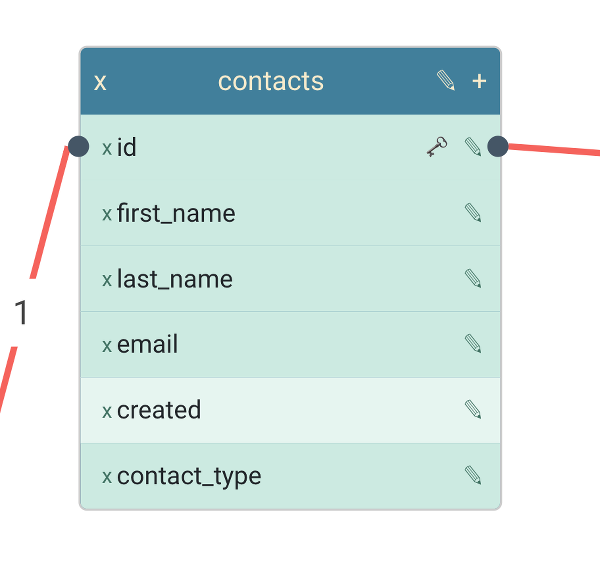
Ports are useful when you need granularity in your data model. We use them in several of our starter apps and demonstrations. For instance, in the Schema builder, a table is represented as a node in the data model, and each of the columns in the table is represented as a port on the table vertex. You can see this in the image on the left below. Another example - the purple node on the right below - is from the Chatbot builder. This is a "choice" node, where the path followed depends on which option from a set of choices is selected - each choice (here the choices are PIN or Password) is modelled as a port on the choice vertex.
|
|
Added support for defaultSize to node/group definitions. Allows you to fix the size for a given vertex type without requiring that the values be in the vertex's backing data.
Added support for nodeSize to UI defaults. This is a fallback for the case that your vertices need to be rendered with a specific width/height but the values are not necessarily going to be available in the backing data.
hierarchical-json over ajax - the content type was not correctly recognised and the data not parsed to JSON.